Category: Microsoft

  • Capgemini is GitHub EMEA Partner of the Year – Why This Matters More Than Just a Trophy

    Capgemini is GitHub EMEA Partner of the Year – Why This Matters More Than Just a Trophy


    Capgemini is GitHub Partner of the Year –
    This is More Than Just a Trophy


    Sometimes the news hits your inbox, and you just stop for a second, smile, and think: “Yes. That’s exactly where we wanted to go.”

    GitHub has officially named Capgemini the 2025 EMEA Services and Channel Partner of the Year. This award recognizes partners that drive innovation, collaboration, and real impact for developers and enterprises across the region. And this year, Capgemini is on that list. The GitHub Blog

    For me as “Mr. Microsoft” inside Capgemini, this is not just a nice badge for the company website. It is a very clear signal: our strategy around Microsoft Cloud, GitHub, and AI-powered development is working. For our teams and for our clients.


    Why this award is a big deal for our clients


    On the surface, “EMEA Services and Channel Partner of the Year” sounds like something mainly for partner managers and sales decks. Underneath, it tells a very practical story for CIOs and engineering leaders:

    You can build your entire modern software factory on GitHub – strategy, tooling, process – and have a partner at your side who knows how to industrialize it at enterprise scale.

    For our clients, this recognition means:

    • We have proven experience rolling out GitHub across large, complex organizations. Not just small pilot teams.
    • Capgemini knows how to align GitHub with Azure, Microsoft 365, and security requirements. Instead of treating it as a “standalone dev tool”.
    • Our experts help teams go beyond source control and use the full GitHub platform. Actions, Advanced Security, Packages, Copilot, and now more and more AI-powered DevSecOps patterns.

    In other words. This award is not about us. It is about the trust that enterprises can place in a joint GitHub plus Capgemini plus Microsoft story.


    Developers, GitHub, and the Microsoft cloud


    If you look at where software engineering is heading right now, one thing is obvious. The center of gravity has moved to GitHub.

    Code lives there.
    Collaboration lives there.
    Security feedback lives there.
    AI-assisted development lives there.

    GitHub is the place where modern engineering teams spend their day. Microsoft Azure is where those workloads run, scale, and connect into the rest of the enterprise. Being recognized as GitHub’s EMEA partner of the year means we are trusted to connect those worlds and make them work as one coherent platform.

    That includes topics like:

    • Designing end-to-end CI/CD with GitHub Actions, Azure DevOps where needed, and Azure as the target runtime.
    • Bringing GitHub Advanced Security and Microsoft Defender for Cloud together into one security narrative.
    • Rolling out GitHub Copilot in a way that fits each client’s compliance, governance, and developer culture.

    For teams, this is where the magic happens. Less context switching, more automation, and a development experience that really feels “cloud native” instead of stitched together.


    What this means for me as “Mr. Microsoft”


    On a personal level, this award feels like a checkpoint on a longer journey.

    For years I have been talking to clients about moving from “just using Git” to building a real developer platform – with GitHub, Azure, the Microsoft intelligent cloud, and now increasingly AI agents and Copilot in the mix.

    When GitHub now says, in effect, “Capgemini is one of our key partners for EMEA,” it reinforces exactly that mission:

    Help enterprises transform how they build software.
    Make the developer experience first-class.
    Anchor everything in a secure, scalable Microsoft Cloud foundation.

    Inside Capgemini, it is also a huge motivation boost for all our Microsoft and GitHub practitioners. From the engineers who automate the pipelines, to the architects who design secure landing zones, to the change managers who help teams adopt new ways of working – this award belongs to all of them.


    Where we go from here


    An award is nice. What really matters is what we do with it.

    For me, the next steps are clear:

    • Double down on GitHub plus Azure as the default backbone for application modernization and greenfield builds.
    • Bring more AI into the development lifecycle in a responsible way: Copilot, AI-powered security, and eventually fleets of AI agents running on Azure that support engineering teams instead of replacing them.
    • Share more stories, patterns, and lessons learned from real client projects – so that others can build on them.

    As “Mr. Microsoft,” I will continue to focus on exactly this: connecting the dots between GitHub, Microsoft Cloud, and concrete business outcomes. This award is a strong sign that we are on the right track – but the most interesting work is still ahead of us.

    Stay clever. Stay collaborative. Stay shipping.
    Your Mr. Microsoft,
    Uwe Zabel.


    🚀 Curious how GitHub, Microsoft Azure, and real-world developer productivity fit together in practice? Follow my journey on Mr. Microsoft’s thoughts—where cloud, AI, and business strategy converge.
    Or ping me directly—because building the future works better as a team.


  • United for Impact: Building the next chapter of Microsoft + Capgemini in Germany

    United for Impact: Building the next chapter of Microsoft + Capgemini in Germany


    United for Impact: Building the next chapter of Microsoft + Capgemini in Germany

    Planning the Future, Together – One Industry and One Solution Area at a Time


    Yesterday, I had the privilege of joining an inspiring session at Microsoft Germany’s Office in Frankfurt. A session that reminded me exactly why I love doing what I do.

    This wasn’t just another meeting. This was Partner Business Planning. A strategic touchpoint where Microsoft and Capgemini came together to shape the joint vision for the next 12 months. Think of it as the control room of a spaceship: vision, navigation, mission planning… all in one place. 🚀

    And here’s the twist: it wasn’t just tech leads and alliance managers. We had colleagues from Capgemini Invent, Cloud Infrastructure, Insights and Data, Financial Services, and of course, our strategic alliance management all in one room, aligned around a single mission: to empower German enterprises with next-generation digital transformation.


    The Power of strategic alignment


    We’re not just talking roadmaps and budgets here. We’re talking solution areas and industry focus that truly reflect what the German market needs—right now and in the near future.

    Together with Microsoft, we dove deep into:

    • Core solution areas that matter most to our joint clients:
      Think Cloud Infrastructure, Data & AI, Security, Business Applications, and Modern Work.
    • Industries in transformation:
      We looked closely at Manufacturing, Public Sector, Financial Services, and Retail—with tailored approaches to support each sector’s unique challenges.

    But what truly made this session special?
    It wasn’t the slides or the metrics—it was the energy in the room. The commitment to co-innovate. And the shared purpose of solving real-world customer problems with the full force of Microsoft’s technology and Capgemini’s industry expertise.


    Why Germany needs strong Cloud Partnerships


    Let’s be honest. Germany is at a crossroads. AI is no longer hype; it’s implementation time. Cloud isn’t a nice-to-have; it’s mission-critical. Sustainability is not a buzzword; it’s boardroom strategy.

    This is exactly why close alliances like Microsoft + Capgemini matter more than ever.

    We bring scale, expertise, and local accountability. Microsoft brings world-leading platforms and unmatched innovation velocity. When we align our people, our portfolios, and our priorities—we unlock value no single organization could create alone.

    This is not just about delivering cloud migrations or AI pilots. It’s about co-creating industry-specific, scalable solutions that move the needle for our clients. With security built in, compliant, and sovereign-ready.


    A Thank you to the People who make it possible


    A heartfelt thank-you goes to Holly Shibly, who has been a consistent and passionate driver of the Capgemini-Microsoft partnership over the years. Holly, your insight, energy, and deep understanding of both organizations continues to inspire us and guide this alliance.

    Also, a big shoutout to all the Capgemini participants across our units who contributed to the discussion with sharp ideas, real-world client experience, and strategic thinking. These are the kinds of cross-functional collaborations that turn vision into reality.


    What’s next? Time to deliver.


    Now comes the exciting part: executing the plan. Driving new co-sell motions. Turning concepts into POCs. Scaling client success stories. All while staying grounded in what our clients really need: outcomes, simplicity, and trust.

    As we move forward, I’m more convinced than ever that this kind of deep, integrated, long-term partnership is what will define the winners in Germany’s next phase of digital innovation.

    We’re not here to follow trends. We’re here to shape them, with Microsoft, with our clients, and with a relentless focus on business impact.

    Stay clever. Stay responsible. Stay scalable.
    Your Mr. Microsoft,
    Uwe Zabel


    🚀 Curious how this plays out in your industry? Let’s talk cloud strategy, sovereign readiness, or AI implementation. Follow my journey on zabu.cloud, where cloud, compliance, and business strategy converge. Or ping me directly because building the future works better as a team.

  • Celebrating Microsoft’s 50-Year Journey

    Celebrating Microsoft’s 50-Year Journey


    Conflict Management

    & Celebrating Microsoft’s 50-Year Journey


    This past week, I had the privilege of attending a Conflict Management training session. Now, before you think, “Oh great, another corporate workshop,” let me assure you it was genuinely eye-opening. I’ve been in various leadership roles for many years, and trust me, I’ve encountered and navigated my fair share of conflicts. But taking dedicated time to systematically reflect on these experiences, analyzing what happened, how I reacted, and what I learned, proved to be incredibly valuable.

    Here’s the thing: wherever people come together, be it at work, in communities, or even within families, conflicts are inevitable. It’s just part of human nature. The critical part isn’t avoiding conflicts at all costs (because honestly, that’s neither realistic nor healthy); it’s about how we manage and resolve them when they do arise. Observing our own responses in the heat of the moment and reflecting afterward is crucial for personal and professional growth.


    Conflict Management changes when under stress


    Interestingly, the training emphasized how our conflict-management styles change dramatically under stress. Imagine this scenario: when we’re relaxed and calm, most of us instinctively aim for cooperative solutions, looking for those magical win-win outcomes. But put us under pressure like tight deadlines, demanding stakeholders, limited resources and suddenly, cooperation might not be our first instinct.

    My honest takeaway from this session? It depends. 😉 Seriously though, your reaction in a conflict heavily depends on the role you’re playing at the moment (whether as a manager, a team member, an executive, or even a spouse or neighbor). It also greatly depends on your relationship with the person on the other side of the table. With someone you hardly know or don’t plan on interacting with long-term, you might naturally lean toward a more assertive stance to ensure your point is clearly made. However, if it’s someone close like your partner, a valued colleague, or a neighbor you’ll see every day, you might find yourself prioritizing compromise and harmony over “winning” the argument.

    It’s fascinating to notice these shifts in our conflict strategies. I’m curious: how about you? When you’re under stress, do you tend to stand your ground and push your perspective assertively? Or are you more inclined to find a middle ground and compromise?


    Microsoft has just turned fifty


    Speaking of long-term relationships and conflicts, there’s one partnership I particularly cherish, despite occasional challenges: Microsoft and Capgemini. Did you know Microsoft just turned 50? That’s right, half a century old! For a tech company, especially in the fast-paced, constantly evolving IT industry, that’s a milestone worthy of celebration.

    Microsoft has shaped our digital landscape profoundly. Founded back in 1975 by Bill Gates and Paul Allen, Microsoft started small, very small. Their first product was a BASIC interpreter for the Altair 8800, a computer most of us today have probably never even heard of. From these modest beginnings, Microsoft quickly rose to prominence, first revolutionizing personal computing with Windows and Office, then branching out into gaming with Xbox, and ultimately becoming a powerhouse in cloud and AI technologies with Azure and Copilot. Microsoft’s journey truly mirrors the evolution of modern technology itself.

    And here’s a fun twist for their 50th birthday: Microsoft aims to set a Guinness World Records title! They’re going for “Most users to take an online multi-level artificial intelligence lesson in 24 hours.” This global event kicks off on April 7 at 23:00 UTC and wraps up exactly 24 hours later, on April 8.


    Celebrate with online training


    What better way to demonstrate the strength of your Microsoft commitment than by participating enthusiastically in this challenge? I strongly encourage all of you to register and represent yourself proudly. You can find out more and sign up right here: AI Skills Fest | Home.

    Reflecting on my own journey over the past five-plus years at Capgemini, particularly focusing on our Microsoft business within the Business Unit Germany, fills me with pride. Together, we’ve accomplished remarkable things:

    • Securing massive, transformative client projects, notably with global giants like Bayer, BMW, Fresenius and more.
    • Earning the prestigious title of Microsoft Partner of the Year in 2022, a testament to our effective and close collaboration.
    • Launching groundbreaking initiatives like our joint Intelligent App Factory and AI-based Application Modernization program.
    • And the cherry on top: since early 2024, Capgemini officially stands as the largest Microsoft partner in Germany.

    These achievements don’t come easily or without the occasional conflict or difficult discussion. But the hallmark of our partnership has consistently been mutual respect, cooperation, and a shared commitment to finding the best possible solutions.

    So, as Microsoft celebrates its 50th anniversary, let me say a heartfelt “Happy Birthday!” 🎉 Thank you, Microsoft, for being an outstanding partner over these decades. I’m eagerly looking forward to our continued journey, hoping for plenty more successes, innovations, and yes, perhaps fewer conflicts. 😉

    Let’s maintain our collaborative spirit, commitment, and focus. Together, I’m confident we’ll achieve sustainable success for years to come with Microsoft Cloud.

    Thanks for everything, dear Microsoft, and here’s to the next chapter in our partnership story!

    Your Mr. Microsoft

  • My experience with AI design tools

    My experience with AI design tools


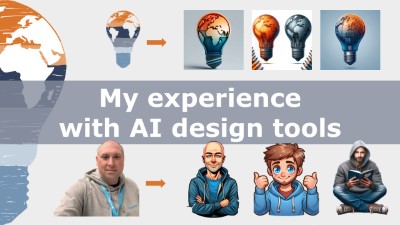
    My experience with AI design tools and what it tells me about the value of human input and the support of strong partners


    I am looking to enhance the branding and design of my blog page, https://zabu.cloud. But the problem is … I am absolutely unskilled when it comes to using design tools. Same goes for the pagebuilder 😉

    So, I’m always on the lookout for tools that can streamline my creative process overcome my lack of skills. Recently, I decided to explore the capabilities of two well-known AI-powered design tools: Microsoft Designer and DALL E Logo Creator. You don’t need to look far to see examples of great visuals generated by generative AI tools – they’re everywhere on social media, often accompanied by a claim of how easy the creation process was. My hopes were high. 

    (more…)

    My experience with AI design tools and what it tells me about the value of human input and the support of strong partners


    I am looking to enhance the branding and design of my blog page, https://zabu.cloud. But the problem is … I am absolutely unskilled when it comes to using design tools. Same goes for the pagebuilder 😉

    So, I’m always on the lookout for tools that can streamline my creative process overcome my lack of skills. Recently, I decided to explore the capabilities of two well-known AI-powered design tools: Microsoft Designer and DALL E Logo Creator. You don’t need to look far to see examples of great visuals generated by generative AI tools – they’re everywhere on social media, often accompanied by a claim of how easy the creation process was. My hopes were high. 

    (more…)
  • SAP & Microsoft Deepen Their Cloud Partnership

    SAP & Microsoft Deepen Their Cloud Partnership


    🚀 SAP & Microsoft Deepen Their Cloud Partnership

    The Next Level of Business Transformation


    There are partnerships—and then there are strategic power moves that make you pause and think: “Okay, this is going to shake things up.” One of those just happened again: SAP and Microsoft are leveling up their cloud alliance. And as your local Microsoft Cloud nerd-in-residence, I’m here to break down why that matters, what’s new, and where we’re headed next.

    Spoiler alert: this isn’t just another press release. This is the next big step in the evolution of SAP S/4HANA on Azure, and it’s got cloud-native automation, Microsoft Teams integration, and enterprise-grade transformation written all over it. Let’s dig in.

    (more…)

    🚀 SAP & Microsoft Deepen Their Cloud Partnership

    The Next Level of Business Transformation


    There are partnerships—and then there are strategic power moves that make you pause and think: “Okay, this is going to shake things up.” One of those just happened again: SAP and Microsoft are leveling up their cloud alliance. And as your local Microsoft Cloud nerd-in-residence, I’m here to break down why that matters, what’s new, and where we’re headed next.

    Spoiler alert: this isn’t just another press release. This is the next big step in the evolution of SAP S/4HANA on Azure, and it’s got cloud-native automation, Microsoft Teams integration, and enterprise-grade transformation written all over it. Let’s dig in.

    (more…)
  • 🚀 SAP & Microsoft Sign 3-Year Strategic Partnership

    🚀 SAP & Microsoft Sign 3-Year Strategic Partnership


    🚀 SAP & Microsoft Sign 3-Year Strategic Partnership

    Simplifying SAP Cloud Migrations


    When two giants of the enterprise software world shake hands, it’s worth paying attention. On October 21, 2019, SAP and Microsoft signed a three-year strategic partnership agreement, aiming to help their joint enterprise customers modernize and migrate their business processes into the cloud.

    This deal doesn’t just tighten SAP’s relationship with Microsoft’s Azure cloud platform—it also highlights SAP’s strategy of working with all three hyperscalers: Azure, AWS, and Google Cloud. Internally, SAP calls this initiative Project Embrace. And that name is telling: SAP isn’t picking sides. Instead, it’s embracing the entire cloud ecosystem.

    That said… it’s clear Microsoft Azure holds a special place at the table.


    🏆 New Leadership, New Focus


    Interestingly, the announcement came shortly after SAP’s longtime CEO Bill McDermott stepped down, making way for Jennifer Morgan—the first woman to lead a company listed in Germany’s blue-chip DAX index.

    And what did Morgan focus on in her first major announcement?
    SAP S/4HANA. No surprise there.

    SAP’s flagship product, S/4HANA, remains at the heart of its cloud transformation strategy. As Morgan highlighted during the company’s Q3 earnings call, SAP posted a 10% revenue increase for the quarter—a sign that the transition from on-premise to cloud services is already paying off.


    ☁️ Why This Partnership Matters


    In Morgan’s own words:

    “We’ve bundled SAP’s cloud platform services to support customers around extension, integration, and orchestration of SAP systems.”

    Translation: SAP’s cloud services will now be sold through Microsoft’s global sales channels. For customers, this means:

    • Simplified purchasing
    • Integrated support models
    • A more cohesive roadmap for running SAP workloads on Azure

    Why does this matter? Because historically, migrating from on-prem SAP systems to the cloud wasn’t exactly… smooth. Many enterprises viewed SAP cloud transformations as:

    • Overcomplicated
    • Resource-intensive
    • Risky
    • And full of hidden costs

    This partnership is SAP and Microsoft’s joint response to those concerns.


    🎯 The Strategic Reality: SAP Cloud or Azure?


    Now, here’s a nerdy detail many outside SAP circles don’t realize:
    SAP’s own SAP Cloud Platform is largely powered by… wait for it… Microsoft Azure.

    Yes, you read that right. SAP Cloud Platform is effectively a managed layer running on top of Azure infrastructure. In other words, customers using “SAP Cloud” are often already leveraging Microsoft’s hyperscaler platform—whether they know it or not.

    This partnership simply formalizes that relationship:

    • SAP focuses on applications, extensions, and business processes.
    • Microsoft delivers the scalable, secure cloud infrastructure underneath.

    From a customer perspective, this is good news:

    • Azure infrastructure with SAP-specific optimizations
    • Microsoft global support combined with SAP services
    • Joint innovations coming from two industry leaders

    🛠️ Making Cloud Migrations Easier


    At its core, this partnership aims to tackle one of the biggest barriers to cloud adoption:

    Complexity.

    Together, SAP and Microsoft are working to:

    • Provide reference architectures for SAP workloads on Azure
    • Co-develop migration toolkits to simplify onboarding
    • Build integrated support models to streamline operations
    • Automate infrastructure provisioning with Microsoft Azure blueprints
    • Reduce the friction of managing hybrid SAP environments

    For companies running SAP on-premises, this partnership sends a clear message:
    It’s time to move. And we’re making it easier.


    🚀 The Big Picture: Why Azure Is Winning SAP Workloads


    While SAP maintains partnerships with AWS and Google Cloud, it’s no secret that Microsoft Azure has become the preferred cloud platform for SAP workloads. Why?

    Because Azure offers:

    • Seamless integration with Microsoft 365, Power BI, and Teams
    • Enterprise-grade security and compliance certifications
    • Deep experience running SAP workloads at scale
    • Familiar management tooling for IT teams (Azure Monitor, Azure Security Center)

    It’s not just about “where your data lives.” It’s about how your business runs.


    🧠 Final Thoughts from Mr. Microsoft


    As someone working deep in the Microsoft Cloud ecosystem, this partnership feels like the perfect match. SAP brings its expertise in enterprise applications; Microsoft brings its hyperscale infrastructure and global reach.

    Together, they’re simplifying SAP cloud migrations—and giving customers a future-proof roadmap to modern ERP.

    If you’re running SAP workloads on-premises and considering your cloud options, this partnership should tell you one thing loud and clear:

    SAP on Azure isn’t just possible. It’s preferred.

    And that’s a message your CIO needs to hear.

    Stay clever. Stay curious.
    Your Mr. Microsoft,
    Uwe Zabel


    🔍 Want to know what SAP S/4HANA on Azure looks like in practice? Dive deeper on zabu.cloud or reach out directly. I’ll help you map your cloud journey—without the buzzwords. 🚀

    Sources: Handelsblatt und Reuters

  • Microsoft’s AI Roadshow 2019 in Cologne and Munich

    Microsoft’s AI Roadshow 2019 in Cologne and Munich


    Microsoft’s AI Roadshow 2019 in Cologne and Munich


    This year, Microsoft is once again hosting an AI Roadshow to convey to its partners that using artificial intelligence is not only simple but is already a part of our everyday lives. Examples include Office 365, Alexa, Siri, Google, and many more.

    Many partners were invited to the two-day roadshow on May 17 in Munich and on May 20 in Cologne, at the respective Microsoft locations. Microsoft traditionally invites some of its partners as speakers for such events to share firsthand insights on the topic.

    (more…)

    Microsoft’s AI Roadshow 2019 in Cologne and Munich


    This year, Microsoft is once again hosting an AI Roadshow to convey to its partners that using artificial intelligence is not only simple but is already a part of our everyday lives. Examples include Office 365, Alexa, Siri, Google, and many more.

    Many partners were invited to the two-day roadshow on May 17 in Munich and on May 20 in Cologne, at the respective Microsoft locations. Microsoft traditionally invites some of its partners as speakers for such events to share firsthand insights on the topic.

    (more…)
  • Belfiore’s Binary Shirt: When Windows 10 Easter Eggs Meet Geek Joy

    Belfiore’s Binary Shirt: When Windows 10 Easter Eggs Meet Geek Joy


    Belfiore’s Binary Shirt:
    When Windows 10 Easter Eggs Meet Geek Joy


    If you watched the Microsoft Build conference as closely as I did, you probably caught Joe Belfiore on stage wearing a Windows logo shirt… made entirely of 1s and 0s. Not just a fashion flex. This was a classic Microsoft wink to the developer crowd and a tiny puzzle hiding in plain sight. Naturally, the community went full Sherlock, grabbed screenshots, and started decoding. And yes—there were real messages baked into that matrix.


    How the Puzzle Worked (and why nerds like me grinned)


    The shirt’s pixels weren’t random noise. They were binary values that, when grouped into bytes and converted to ASCII, spelled out cheeky easter-egg phrases. This nods to the Windows 10 story we heard at Build. Think about references you’d expect. Plenty of insider-ish winks to the Windows Insider community and Build itself. It was a love letter to the people who read hex dumps for breakfast and compile code before coffee. Guilty as charged.

    If you’ve never decoded one of these before, the trick is simple but satisfying. Capture the bit pattern, split it into 8-bit chunks (e.g., 01001000 = 72). Map each byte to its ASCII character (“H”), and watch the phrase materialize. It’s like opening a Mystery Box from the keynote—one byte at a time.

    blank

    Why this tiny shirt easter egg mattered to me


    Windows 10 is more than a version bump. It is Microsoft’s “one platform” moment—PC, tablet, phone, even IoT—pulling together under one UX and app model. Build put that ambition on stage. Continuum promised fluid transitions between form factors. Cortana moved from novelty to real assistant. Universal Windows Platform signaled a simpler, more powerful developer path. HoloLens hinted at where computing could go next. Embedding messages in binary wasn’t just a gag. It mirrored the core theme of Windows 10: delight the devs, bring them inside the story, and reward curiosity.

    For those of us who live in the binaries as much as the UI, the shirt said: “We see you.” In a year when Windows 10 was converging devices and experiences, a playful nod to the folks who turn 1s and 0s into products was right on brand.


    Culture, community, and a new Windows decade


    This is why I love the Microsoft developer culture at its best. It mixes rigorous engineering with a sense of play. You can announce major platform shifts—and still sneak in a puzzle that only a subset will decode. That subset happens to be the same group shipping the code, filing the feedback, and building the next wave of apps. Windows was evolving fast, Insider builds were landing frequently, and Build felt like a handshake between Redmond and the people writing the future.

    If you missed the decode threads, the short version is simple: yes, there were messages; yes, they referenced the Windows 10 era; and yes, the community cracked them—because of course we did. That’s the point. We’re here for the bits and the delight.

    The first message is:

    There are 10 types of people in the world

    This referenced back to the binary code where 10 means two. So it means there are two types of people in this world. Those who understands Binary, and those who don’t.

    The second Message is:

    Windows 10, because 7 8 9

    Where you need to speak it out loud to understand. Say “seven ate nine”. Because Windows 10 comes right after Windows 8 and there is no Windows 9.

    The other two messages are straight forward

    Congrats on being one of the first.

    Windows Insiders help us develop the future. Talk to us @ Windows

      blank

      My Final thought


      Sometimes the smallest details tell you the most about where a platform is headed. Today, Windows 10 promised coherence, momentum, and a developer-first heartbeat. That binary shirt? A tiny, joyful proof that the heartbeat was strong.

      Stay clever. Stay curious. Stay a little nerdy.
      Your Mr. Microsoft,
      Uwe Zabel


      🚀 Curious how hidden messages, Windows 10, and developer culture intersect? Follow my journey on Mr. Microsoft’s thoughts—where cloud, AI, and business strategy converge.
      Or ping me directly—because building the future works better as a team.

    • Microsoft Continuum for Phones: How Windows 10 Turns Your Smartphone into a PC

      Microsoft Continuum for Phones: How Windows 10 Turns Your Smartphone into a PC


      Microsoft Continuum for Phones:
      How Windows 10 Turns Your Smartphone into a PC


      Turning your phone into a PC used to sound like sci-fi. At Build 2015, Microsoft walked on stage and said, in classic understatement: “Yeah, we can do that.” With Windows 10 and Continuum for phones, your smartphone suddenly looks a lot less like a handset and a lot more like a pocket-sized PC tower.

      As someone who lives in the Microsoft ecosystem all day, this moment feels like a glimpse into a future where the device in your pocket is the core of your digital life, and screens are just satellites you dock into.


      From phone screen to desktop display


      So what is Continuum for phones, exactly? In simple terms: you connect a Windows 10 smartphone to a larger display and peripherals, and the phone transforms its user interface into something that looks and behaves very much like a Windows 10 desktop.

      In the Build demo, Microsoft showed a Windows 10 phone plugged into an external screen, with a Bluetooth keyboard and mouse attached. The result looked strikingly familiar: a Start menu, taskbar, windowed apps, and the ability to move things around like on a regular PC, while the phone itself stayed fully functional.

      Under the hood, there is no secret second operating system. It is still the same Windows 10 on your phone. Universal apps simply adapt to the new form factor, scaling up gracefully from a small portrait screen to a full HD monitor. Your Outlook, Word, Excel, PowerPoint, and other universal apps become “desktop-style” without you changing the device.

      The phone is the computer. The screen is just that: a screen.


      One device, many experiences


      What excites me most is not the demo itself, but the mindset shift behind it. Continuum for phones is Microsoft taking the idea of “one platform, many devices” and applying it all the way down to your pocket.

      For years, we have lived with a split brain:

      • One device for email and Office on the go
      • Another device for “real work” at the desk
      • Maybe a tablet somewhere in between

      Continuum suggests a different model. You might carry a single Windows 10 phone and plug it into whatever is available:

      • A docking station at the office
      • A monitor in a hotel room
      • A screen and keyboard in a shared project space

      On each of these, you get a full-screen, keyboard-and-mouse experience powered by the same device. Your identity, your apps, your data, your policies – all travel with you. No more juggling multiple machines, VPN setups, and half-synced profiles.

      For IT, this is where it gets really interesting. If the phone becomes a secure, policy-driven workplace endpoint, backed by Azure Active Directory, Intune, and enterprise management, we are suddenly talking about new device strategies entirely. Fewer full-blown PCs, more smart phones that can “scale up” when you sit down at a desk.


      Why Continuum matters for app modernization


      From an application perspective, Continuum is also a very loud message to developers: if you build true universal Windows apps, you get new form factors for free.

      In the past, you often needed:

      • A separate desktop application
      • A separate phone app
      • Maybe a web app on top

      With Windows 10 and Universal Windows Platform (UWP), the idea is different: one codebase, adaptive UI, and multiple screen targets. Continuum for phones turns that into a compelling promise: build it once, run it on the phone, and when the phone connects to a larger display, your app automatically “grows up” into a desktop-like experience.

      That is pure gold for application modernization:

      • Legacy line-of-business apps can be reimagined as adaptive Windows 10 apps.
      • Field workers can carry a single device and still work on “desktop-grade” screens on-site.
      • Enterprises get a consistent experience, whether users are on a phone screen or a full monitor.

      For me as “Mr. Microsoft”, this is where Continuum moves from “cool demo” to “strategic pattern”: it pushes us towards building apps that care less about the device and more about the experience.


      Scenarios that suddenly become possible


      If you think beyond the keynote stage, a few real-world scenarios practically beg for Continuum. Imagine:

      • A consultant travels with only a Windows 10 phone. At the client site, they plug into a monitor and keyboard and run full presentations, email, and documents – all from the phone.
      • A frontline worker in a warehouse uses the phone as a handheld scanner and data capture device, then docks it in the office to process reports in Excel or a custom business app.
      • Small businesses provide just docking stations and screens at each desk, while employees bring a corporate-managed Windows 10 phone that becomes their only “PC”.

      Is this going to replace every desktop overnight? Of course not. Heavy workloads like 3D rendering, large-scale data analytics, or complex development environments will still favor full workstations for now. But for a huge portion of information workers, this “phone as PC when docked” model is a very real option.

      And that is exactly why Continuum feels like a glimpse into the future, not just another mobile feature.


      What about the limitations?


      We are still early in 2015, and Microsoft is clear that Continuum for phones is a work in progress. There are a few important caveats:

      • Only modern universal apps will support the responsive, desktop-style experience. Classic Win32 desktop applications will not magically run on your phone.
      • Hardware requirements matter. Phones will need enough CPU, GPU, and memory horsepower to drive external screens smoothly.
      • Enterprises must be ready with management, identity, and security concepts that support this convergence of phone and PC.

      But every new platform starts with limitations. The key is direction of travel, and here it is very clear: Windows 10 is not “one OS with many compromises”, but a unified platform that adapts to where you are and what you are using.

      From my point of view, Continuum for phones fits neatly into Microsoft’s bigger story:

      • A single Windows core powering phones, tablets, PCs, and even Xbox
      • A shared app model (UWP)
      • Cloud-powered identity and management via Azure AD and Intune
      • And now, a UI that dynamically adjusts all the way from palm-sized to full desktop

      Why this resonates with me


      I started my own journey in tech on very different machines: old Commodore systems, DOS, early versions of Windows. We moved from text-only interfaces to graphical desktops, from beige towers to sleek laptops, from local applications to cloud services.

      Continuum feels like the next chapter in that evolution: the PC shrinks into your pocket, but the experience expands onto whatever screen is closest. The phone is no longer “the little companion” – it is the core.

      As someone who helps clients modernize their applications and infrastructure, I see Continuum as an invitation:
      Design for mobility and productivity first, not for a specific device.
      Build apps that adapt, not apps that are locked to one form factor.
      Assume your users will want to move seamlessly between contexts – desk, meeting room, train, home – without losing their workspace.

      If Microsoft executes well on Continuum for phones, the line between “phone”, “tablet”, and “PC” could become less and less meaningful. In the end, it is all Windows 10 – just expressed through different screens and inputs.


      Conclusion


      Turning a Windows 10 phone into a PC-sized experience is more than a party trick at a developer conference. It is a signal that our computing world is changing again. Devices become docks. Apps become adaptive. And your “PC” might soon be wherever your phone is.

      Will Continuum for phones become the new normal, or remain a niche feature? In May 2015, we cannot know yet. But as a long-time Microsoft watcher and practitioner, I am convinced of one thing: this is exactly the kind of bold experiment we need to move beyond the old “one user, one PC” mindset.

      Stay clever. Stay mobile. Stay converged.
      Your Mr. Microsoft,
      Uwe Zabel.


      🚀 Curious how Windows 10 Continuum and device convergence could reshape your workplace? Follow my journey on Mr. Microsoft’s thoughts—where cloud, AI, and business strategy converge.
      Or ping me directly—because building the future works better as a team.

    • Welcome to Zabu.Cloud ☁️🚀

      Welcome to Zabu.Cloud ☁️🚀


      Welcome to Zabu.Cloud ☁️🚀


      Still curious. Still cloudy. Since 2008.

      It all started in 2008 with blog-live.de — a place where I explored mobile phones, network providers, and Microsoft’s emerging consumer cloud products. Back then, it was just me, a keyboard, and a passion for tech. I welcome all who are interested in these topics.

      Fast forward to 2019: the blog moved to its new home — zabu.cloud.
      New name. New energy. Sharper focus.
      From that point on, it became the go-to spot for my thoughts on Microsoft Cloud, Enterprise IT, and Business Transformation.

      In 2023, another major milestone: the release of my book “SAP auf Hyperscaler-Clouds”.
      From then on, SAP on Azure became a core topic here — bringing together my cloud expertise and the real-world needs of enterprise clients.

      Today, this blog is my digital workshop, speaking stage, and thinking space.
      It’s where I reflect, share, and challenge ideas about cloud strategy, architecture, AI, and the evolving Microsoft ecosystem.

      If you’re looking for honest insights, practical experience, and a voice that blends tech depth with business relevance — welcome.

      ☕ Grab a coffee. Let’s talk cloud.
      Uwe Zabel, aka Mr. Microsoft

      Updated: 1st of July 2025