











🚀 Microsoft Flow is Now Power Automate
In classic Microsoft fashion, another product has been renamed. But before you roll your eyes and update your documentation:
This time, it actually makes sense.
Say hello to Microsoft Power Automate – the new identity of what you once knew as Microsoft Flow. And no, this isn’t just a branding exercise. It’s a signal of something bigger: The rise of the Power Platform as the go-to toolkit for modern business automation.
So, let’s talk about what’s changing, what’s coming, and why automation just got a lot cooler.
⚡ Why Flow Became Power Automate
Microsoft Flow was always about automating workflows. It helped users streamline tasks between Office 365 apps, connect cloud services, and create simple “If this, then that”-style flows.
But the Microsoft ecosystem has grown. And now, automation isn’t just an add-on, it’s core to how businesses operate.
By renaming Flow to Power Automate, Microsoft officially brings it under the Power Platform umbrella, joining:
- Power BI for data visualization
- Power Apps for low-code app development
- Power Automate for process automation
Together, they form the backbone of modern business applications—the very same tools extending the power of Dynamics 365 CRM, Business Central, and Finance & Operations.
In short: If the Power Platform is the Swiss Army knife of business transformation, Power Automate is the blade that cuts through repetitive tasks.
🤖 UI Flows – Say Hello to RPA
But renaming was just the start. Microsoft also dropped a major new feature:
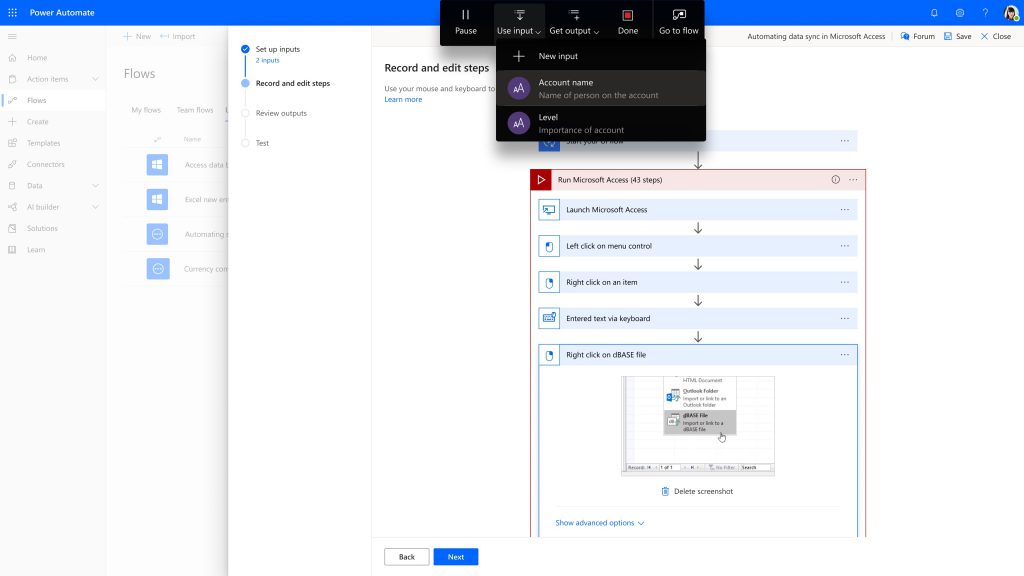
UI Flows – bringing Robotic Process Automation (RPA) directly into Power Automate.
Think of UI Flows as a virtual assistant that clicks buttons, fills forms, and mimics user actions—across both modern cloud apps and old-school legacy systems. It’s like giving your workflows a pair of robotic hands.
Why this matters:
Let’s face it—many businesses still rely on systems that don’t have APIs or cloud connectors. Those old legacy apps? They’re not going away anytime soon. UI Flows bridges this gap.
Suddenly, Power Automate isn’t just for cloud ninjas—it’s for everyone.
🛠️ A Real-World Example (Because Who Doesn’t Love Those?)
Imagine this:
- Your customers submit contracts—some via an online form, others as scanned PDFs, or worse: paper forms via snail mail.
- The digital ones get processed automatically.
- The paper ones? Your staff manually types them into your 1998-era legacy CRM. (Sound familiar? You’re not alone.)
With Power Automate and UI Flows, you can:
- Use AI Builder to extract data from scanned paper forms.
- Feed that data into your process automatically.
- Use UI Flows (RPA) to enter the data into your legacy CRM—without human intervention.
In geek terms:
You’ve just automated an end-to-end, cross-system business process that spans cloud, AI, and legacy platforms. 🔥
🌉 Bridging API Automation and UI Automation
That’s the power of Power Automate:
- Cloud? Check.
- On-premises? Check.
- API integration? Obviously.
- No API? UI Flows has your back.
Microsoft’s vision here is clear:
“Unify your automation strategy on one single platform.”
Power Automate becomes your one-stop-shop for workflow orchestration—regardless of where your data lives.
🚀 Why This Matters for the Future of Business Automation
Automation isn’t optional anymore. It’s the engine driving digital transformation. But most businesses live in hybrid worlds—half cloud, half legacy. Until now, they needed different tools for each. Microsoft just tore down that wall.
Now, every company—small, medium, or enterprise—can automate processes across all systems using a unified, scalable platform.
Power Automate isn’t just Flow with a facelift.
It’s Flow leveled up. Like Flow after a montage scene in a superhero movie. 🦸♂️
🔥 Mr. Microsoft’s Take
I’ve worked on enough automation projects to know this:
“If you can standardize it, you can automate it.”
And now? You can automate everything—with clicks, scripts, or AI, all in one place.
If you’re serious about saving time, scaling operations, and freeing your teams from boring tasks, Power Automate deserves a spot in your toolbox.
The future of work is automated—and Microsoft just handed you the keys.
📚 Want to Learn More?
- Explore Power Automate
- Discover UI Flows
- Dive deeper into the Power Platform
Or stick around on zabu.cloud—where we cut through the buzzwords and dive into real-world use cases.
Stay curious. Stay automated.
Your Mr. Microsoft,
Uwe Zabel
💬 Ready to automate your first legacy process? Or still confused about RPA vs API? Drop a comment below—I’ll help you figure it out. 🚀
Discover more from Mr. Microsoft's thoughts
Subscribe to get the latest posts sent to your email.



One thought on “🚀 Microsoft Flow is Now Power Automate”